Sunday, 7 August 2016

Use USB as RAM

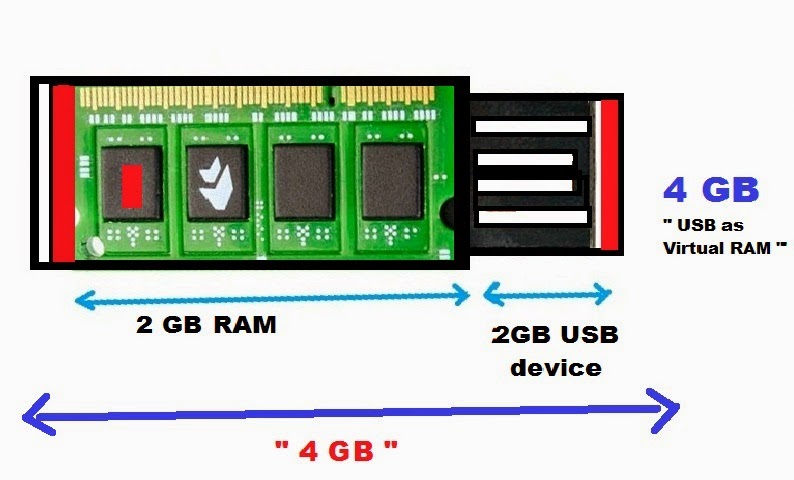
How to Use USB as a RAM???


We use USB to transfer data. The USB can be used as RAM. Let’s start with windows vista; those who use pc’s can use their USB drives to increase the performances of their computer. This is called ReadyBoost. Ready Boost deal with free space that is on your USB drives, such as RAM. When we increase RAM that’s equal to more speed. Ready Boost comprise on all free versions of windows vista and windows 7. It’s easy to setup the positions and in few minutes it can be finished. 

1. Insert the USB drive in your computer.

2. Go to "My Computer" then right-click on the USB drive

3. Go to "Properties"


4. Next, click on the "ReadyBoost" tab.

5. Choose the option that says "Use this device".

6. Under "Space to reserve for system speed", select the amount of memory that you wish to use for your USB flash drive.

The amount of memory that Windows recommends is usually the best setting and should not be exceeded.

7. Click on "OK" to save your settings and exit.

8. Restart your computer for the changes to take affect.

Earn Money On Youtube


How to Earn Money On Youtube ???


Whether your goal is to earn back some of what you spent making your videos or to become a sustainable business, YouTube’s platform lets you make money with successful videos. Get your channel ready to earn:

Step 1: Enable your channel for monetization.
Step 2: Connect your YouTube channel to an AdSense account in order to earh money and get paid for your monetized videos.
Step 3: Take a minute to get to know the kinds of videos you can monetize and the different ad formats.
Step 4: Select “monetize with ads” for your videos and choose which ad formats and videos you want from Creator Studio app and in video manager.
Step 5: Keep making great videos that your community loves to watch!

 Note: Monetization is only available in certain countries, and copyright or community guidelines violations can affect your eligibility to earn money


Ways to Earn Money


There are different ways you can earn money with your channel. Start with ads and then look into other ways you can make money. Ads Now that you’ve enabled monetization (and hopefully enabled all formats to maximize revenue!), ads can run on your videos. Keep in mind: Other ways of making money on YouTube If you’re already making money with ads on your videos and have an established audience you could look into: There are different ways you can earn money with your channel. Start with ads and then look into other ways you can make money. YouTube connects your channel to paying advertisers so you can focus on what you do best: creating. In most cases, you get paid when viewers watch ads. We're constantly improving our ad systems so they work better for viewers and pay out to more creators. You can also earn money from YouTube Red subscriptions. YouTube Red members pay a recurring fee for special benefits like watching YouTube videos without ads. The amount you earn from YouTube Red is calculated based on how much time members spend watching your content compared to other content. Fan Funding: In some regions, YouTube offers a built-in tip jar where your audience can offer monetary support directly to your channel.

Some Ways to Boast Your Earning..
1. Use YouTube to get traffic to your website and blog.

If you’ve got a website or blog which brings in income, you need traffic. Many websites were hard-hit by Google’s Panda, Penguin and Hummingbird updates. If this happened to you, you’re hurting. You can use YouTube to not only regain traffic, but also increase it. Get started using the Creator Playbook. Once you’re set up, consider repurposing some older content into videos, as well as creating new videos. Make sure that you link to your own website in the first line of your video descriptions, so you can funnel your YouTube traffic to where you want it to go.
2. Create products and promote them on YouTube.
If you’re creating your own products or would like to, YouTube offers unlimited ways for you to promote your products and make sales. Products you can create include ebooks, apps, art, and music. Create your products, and add them to a shopping cart. Then use YouTube to promote them. As we mentioned above, add a link to your product in your video’s description, so that viewers can buy.

3. Sell others’ products as an affiliate marketer.

“Affiliate marketing” means selling products in exchange for a commission. Hundreds of thousands of companies offer attractive deals to affiliate marketers who promote their products, including huge companies, like Amazon and eBay, as well as smaller companies. Additionally, there are many affiliate networks you can join. 
To make money from YouTube as an affiliate marketer, review your affiliate products on video, or create “how to use this product” tutorials. Don’t forget to link to your products in your YouTube descriptions – make sure you’re using your affiliate link, or you won’t get credit for sales.

4. Get creative: Create a Web TV series.

Love telling stories? YouTube lets you create your own Web TV shows. You’re limited only by your imagination… and your budget. You can create a comedy series, a drama series, or your own talk show. Be aware that YouTube limits your show’s length to 15 minutes. To upload longer videos, you’ll need to increase your limit. If you’re a frustrated TV or screen writer, get a few friends together, and record your own TV shows. You never know. If you get lots of views, you may develop a new career.

5. Become a YouTube personality.

YouTube stars can make a lot of money. BlueXephos for example, has almost a billion channel views. At $7 per thousand video views, the income soon mounts up. If you’ve got quirky ideas, or are passionate about your interests, develop your YouTube channel. You never know, you may be the next YouTube star.

6. Monetize your videos with the YouTube Partner Program.

After you’ve created several videos, it’s time to join the YouTube Partner Program. All you need to do is enable your channel for monetization, and you’ll receive your share of the income from advertising on YouTube. Just as the YouTube stars do, you’ll get paid for each thousand views on your videos. Click this link to get started – your first step is to verify your channel.

7. Teach: share your knowledge with tutorials.

Tutorials are huge on YouTube. If you know how to do something, you can teach others, and make money from your videos. Beauty videos are popular.Michelle Phan for example has over 1.3 million views.
Teach: share your knowledge on YouTube8. T-estmarket your products.YouTube is an amazing resource for market research – you can soon discover whether your brilliant, innovative idea is likely to be profitable. For example, if you’ve got an idea for a product, but need funding, create some videos before you create a Kickstarter.com campaign. The views and comments on your videos will tell you whether your idea is viable in its present form. The YouTube audience can even help you to make it viable, so that your efforts to get funding are successful.9. Become an expert on meta data: use keywords to get an audience.One hundred HOURS of video are uploaded to YouTube every MINUTE. This means that there’s huge competition for attention. You need to do everything you can to ensure that your videos get found. Your videos’ meta data will help. “Meta data” is data which gives information about your videos. In its Creator Playbook, YouTube tells you how to create your meta data:
YouTube is the world’s second-largest search engine, and it uses metadata – your video’s title, tags and description – to index your video correctly. To maximize your presence in search, promotion, suggested videos and ad-serving, make sure your metadata is well optimized.
Optimizing your videos for search makes the difference between success and failure, so be sure to do it.

10. Build your brand using YouTube.

As marketing guru Tom Peters pointed out way back in 1997, you’re a brand, and you have power. YouTube helps you to amplify YOU. Whatever you’re doing, and whatever your job, YouTube can help you to become known for your strengths, and make money. Even if you have no clear idea on how you could make money on YouTube, get started creating videos about your interests. You may just stumble across a gold mine… just as the people who turned their pets into stars have done.

11. Turn your child or pet into a star (and make money).

Two cats, Lil Bub and Grumpy Cat, started out on YouTube, and have become worldwide stars, with book deals.As Forbes points out:
“You do not have to be a singer to become a YouTube star. If you are lucky, you could shoot a video of your child, pet, or a double rainbow that strikes a chord and goes viral.”
So keep your video camera handy. If you see something cute, video it, and upload the video. (Don’t forget the meta data.) You never know who or what will be the next video sensation. Create that sensation, and you’ll make money. 
Friday, 5 August 2016

Useful Keyboard Shortcuts


Basic PC shortcut keys


Below there is a list of some of the most commonly used basic shortcut keys that work with almost all computers and software programs. It is highly recommended that all users keep a good reference of these shortcut keys or try to memorize them. Doing so will dramatically increase your productivity.

Most Used shortcuts

Shortcut Keys Description
Ctrl + S Save current document file.
Ctrl + X Cut selected item.
Ctrl + C Copy selected item.
Ctrl + V Paste.
Ctrl + Z Undo.
Ctrl + Y Redo.
Ctrl + A Select all text.
Shift + Delete Delete permanently.
Alt + F4 Close the currently active program
F5 Refresh the current program window.
Ctrl + Alt + Delete terminate an application task.

Other Basic shortcuts

Shortcut Keys Description
Alt + F File menu options in current program.
Alt + E Edit options in current program.
Alt + Tab Switch between open programs.
F1 Universal Help in almost every Windows program.
F2 Rename a selected file.
Ctrl + N Create a new, blank document in some software programs.
Ctrl + O Open a file in current software program.
Ctrl + B Change selected text to be Bold.
Ctrl + I Change selected text to be in Italics.
Ctrl + U Change selected text to be Underlined.
Ctrl + F Open find window for current document or window.
Shift + Del Cut selected item.
Ctrl + Ins Copy selected item
Shift + Ins Paste.
Ctrl + K Insert hyperlink for selected text.
Ctrl + P Print the current page or document.
Home Goes to beginning of current line.
Ctrl + Home Goes to beginning of document.
End Goes to end of current line.
Ctrl + End Goes to end of document.
Shift + Home Highlights from current position to beginning of line.
Shift + End Highlights from current position to end of line.
Ctrl + Left arrow Moves one word to the left at a time.
Ctrl + Right arrow Moves one word to the right at a time.
Ctrl + Esc Opens the START menu
Ctrl + Shift + Esc Opens Windows Task Manager
Alt + Enter Open the Properties for the selected item (file, folder, shortcut, etc.)

PC shortcut keys for Special Characters

Below are some of the more common and popular special characters and the keyboard shortcuts to create them.
Shortcut Keys Special Character
Alt + 0224 à
Alt + 0232 è
Alt + 0236 ì
Alt + 0242 ò
Alt + 0241 ñ
Alt + 0228 ä
Alt + 0246 ö
Alt + 0252 ü
Alt + 0248 ø
Alt + 0223 ß
Alt + 0198 Æ
Alt + 0231 ç
Alt + 0191 ¿
Alt + 0176 °  (degree symbol)
Alt + 0177 ±  (plus/minus symbol)
Alt + 0153 ™
Alt + 0169 ©
Alt + 0174 ®
Alt + 0128 €  (Euro currency)
Alt + 0162 ¢  (Cent symbol)
Alt + 0163 £  (British Pound currency)
Alt + 0165 ¥  (Japanese Yen currency)

Wednesday, 15 June 2016

Extract file with 7zip: the video


So first of all you should go to www.7-zip.org to download the right version of 7z.
Its available on almost every platform from 32bit windows OS to the last Mac OS.
Follow the classic instalshield wizard to install the application on your computer. This step goes pretty fast as 7zip is a very small program.
Once 7zip is installed you just need to select a file, right click on it, go to “7zip” and select add to “nameofthefile.7z”.
The compressed version of your file will automatically appear in the same folder as the original file.
To extract file you need to do the exact same , right click on the compressed file of folder, go to 7zip, select extract here.
The file appears again in his original format, exactly the same as before the compression.

So now lets talk a little bit more about 7zip.
7-Zip is an archiving and compression tools that’s completely free. 7-Zip fully supports the following seven compression formats: 7z, bzip2, GZIP, TAR, WIM, XZ, and ZIP. Additionally, 7-Zip can extract an additional 24 formats: ARJ, CAB, CHM, cpio, cramfs, DEB, DMG, FAT, HFS, ISO, LZH, LZMA, MBR, MSI, NSIS, NTFS, RAR, RPM, SquashFS, UDF, VHD, WIM, XAR, and Z.
According to its webpage, 7-Zip’s compression performance for ZIP and GZIP formats is between 2 and 10 percent superior to that of its competition.
7-Zip integrates into the Windows Explorer context menus, and it displays archive file as normal folders. This application also has its own file manager, which includes a compression-focused toolbar and drag-and-drop functionality. All Windows versions from 98 to 8 are supported, as are multi-core processors and Hyper-Threading. 7-Zip is available to download in 32-bit or 64-bit versions with a total of 79 languages to choose from.
Hope you enjoyed the video, please subscribe to our youtube channel, newsletter or like us on Facebook.

Manage multiple facebook accounts at the same time


You have multiple Facebook accounts and you want to run all of them at the same time on the same browser?
You want to get rid of having to log out of your first account to log in to the second one ?
It is possible and it’s really easy.

Follow these steps:

Go to Facebook.com and login to your first account. You can then go to the menu of your web browser and click open a new incognito window.
You can also use the shortcut Ctrl + shift + N. There you go you can log in with a different Facebook account without encountering any problem.
You can be active on both facebook accounts at the same time.
So please enjoy both the IDs at the same time in the same browser.
Remember thought that having different Facebook accounts is against their rules.
Take a look at the following extract from Facebook policies.

Can I manage multiple facebook accounts?

Facebook is a community where people use their authentic identities. It’s against the Facebook Community Standards to maintain more than one personal account.
If you want to represent your business, organization, brand or product on Facebook, you can use your personal account to create and manage a Page. Keep in mind that a personal profile is for non-commercial use and represents an individual person. Learn more about the differences between Pages and profiles. If you’re using your profile to represent something other than yourself, you can convert it to a Page. If you’re a public figure, learn about allowing followers. If you have 2 or more accounts, learn how to move your information into a single account. You can also add another name (ex: maiden name, nickname, former name) to your account.
Thanks for watching the video and reading the post.
Subscribe to Facebook & our youtube channel for new tricks.

How to speed up your System


Here are the fews steps to speed up your computer easily

1. Go to run , type “temp” , run it , and delete all the files you see there.


2. Go to run , type “%temp%” , run it , and delete all the files you see there.


3. open the task manager (Ctrl + alt + dlt ) , go to startup, disable all the programs


Subscribe to mastitrickss,blogspot.com & our Youtube channel for more tricks & Videos

Lock any Folder Using NotePad

Want to Hide your important files ?
or wanna Lock them?
You can do it Using Notepad.
Just Follow these Simple steps
1. Paste Text in notepad
https://www.dropbox.com/s/ogfxj141430gywr/folder%20lock%20code.txt?dl=0
2. Write your password in place of
“PASSWORD_GOES_HERE”
3. Save it as “Locked.bat”
4. Open it.
5. Put your files into “private”
6. Again open “Locked.bat”
7. type “y” and press “Enter”
8. Now to access your files
Open “Locked.bat”
9. Enter your Password
10. To again lock open locked,
and type “y” .
you can also copy and paste code from here
cls
@ECHO OFF
title Folder Private
if EXIST “Control Panel.{21EC2020-3AEA-1069-A2DD-08002B30309D}” goto UNLOCK
if NOT EXIST Private goto MDLOCKER
:CONFIRM
echo Are you sure you want to lock the folder(Y/N)
set/p “cho=>”
if %cho%==Y goto LOCK
if %cho%==y goto LOCK
if %cho%==n goto END
if %cho%==N goto END
echo Invalid choice.
goto CONFIRM
:LOCK
ren Private “Control Panel.{21EC2020-3AEA-1069-A2DD-08002B30309D}”
attrib +h +s “Control Panel.{21EC2020-3AEA-1069-A2DD-08002B30309D}”
echo Folder locked
goto End
:UNLOCK
echo Enter password to unlock folder
set/p “pass=>”
if NOT %pass%== PASSWORD_GOES_HERE goto FAIL
attrib -h -s “Control Panel.{21EC2020-3AEA-1069-A2DD-08002B30309D}”
ren “Control Panel.{21EC2020-3AEA-1069-A2DD-08002B30309D}” Private
echo Folder Unlocked successfully
goto End
:FAIL
echo Invalid password
goto end
:MDLOCKER
md Private
echo Private created successfully
goto End
:End


Copyright @ 2013 Masti Tricks.